This is the multi-page printable view of this section.
Click here to print.
Return to the regular view of this page.
Hubs — On-Site Receivers for Your Sensors
OGLAS hubs are on-site receivers that collect your sensor data, confirm it, log it, and hand it on to Local analysis or an optional Cloud copy. LoRa, mesh, and satellite hubs, with optional large or small displays.
A hub is the on-site collection point for an OGLAS install. It listens to
every sensor in range, confirms the messages, logs the data, and
hands it on — to Local analysis on the site, or an optional private
Cloud copy off-site. There’s no cloud account in the middle and nothing
has to leave the site unless you choose.
The right hub depends on how your sensors reach it and how far the data has to
travel:
- LoRa Hub — the workhorse. Long-range, low-power radio straight to
the hub. The default for most sites.
- Mesh Hub — sensors and repeaters relay for each other, so coverage
stretches around hills, sheds, and dead spots without a single line-of-sight
path back.
- Satellite Hub — for sites with no other way out: the hub
itself reaches the outside world over satellite.
And how you want to see it on site:
All of them share the same OGLAS firmware core — the difference is the transport
they use and how much screen they have. Need a transport that isn’t listed, or a
mix? That’s a custom build.
1 - LoRa Hub
The workhorse OGLAS hub — long-range LoRa receiver, local logging, headless or paired with a display.
The OGLAS LoRa Hub is the simplest way to start, and the default for most
sites. It sits on a shelf in the shed or office, listens for sensor messages over
long-range LoRa, and logs everything to local storage. No display required — point
Local on a laptop, SBC, or NAS at it and you’ve got the lot.
What it does
- Listens for sensor readings from every device in range, confirms back so the sensor knows it got through.
- Listens on short-range wireless as well — a shorter-range link that uses less airtime, so nearby sensors save battery and leave the long-range channel clear for the ones that need it.
- Stores readings locally to flash / SD / a connected host, in a format you control. Your data, your formats, your backups — see Your data is your data.
- Forwards commands — when you want to open a gate or ring a bell, the hub sends the instruction to the right device and collects the response.
Hardware
Purpose-built wireless hardware with long-range LoRa radio. Compact, low-power, designed to sit on a shelf and run 24/7.
Headless or with a display
The LoRa Hub is purposely headless by default — most sites put it next to a router or NAS that already has a screen elsewhere. If you do want it on its own:
For solar-powered sites, add power management so MPPT production data lands on the same screen as your sensors.
Other transports
If straight-line LoRa doesn’t reach — hills, sheds, or dead spots in the way, or no path off-site at all — look at the Mesh Hub or the Satellite Hub instead.
Why on-site
A hub that lives where your sensors live means:
- Sensor messages don’t need to travel further than your site — see No telco dependency.
- You keep working through internet outages.
- Your data never leaves the site unless you ask it to. From here it flows to Local, and optionally to Cloud.
Building this into a larger site? That’s exactly what we do — start a custom build or email us.
2 - Mesh Hub
An OGLAS hub for mesh networks — sensors and repeaters relay for each other, so coverage reaches around hills, sheds, and dead spots without a single line-of-sight path.
The OGLAS Mesh Hub is for sites where a straight radio line from sensor to hub
doesn’t exist. Instead of every device needing to reach the hub directly, devices
(and dedicated repeaters) relay for each other — a reading hops node to node
until it lands at the hub.
When you want mesh
- Broken line-of-sight — a hill, a steel shed, a tree line, or a fold in the
ground sits between a sensor and the hub.
- Sprawling sites — the far corners are past the range of a single LoRa link,
but there are devices in between to carry the signal.
- Resilience — if one path goes down, traffic finds another way through the
mesh rather than a sensor simply going silent.
What it does
- Collects from the mesh — confirms readings and logs them locally, exactly
like the LoRa Hub, but the messages arrive via one or more hops.
- Self-heals — nodes discover neighbours and re-route automatically as devices
come and go or conditions change.
- Mixes sensors and repeaters — most OGLAS sensors can carry mesh
traffic for their neighbours; add low-cost repeaters to bridge the gaps that have
no sensor of their own.
Trade-offs, honestly
Mesh buys coverage at the cost of a little latency and power — each hop adds a
small delay, and relaying nodes can’t sleep as deeply as a leaf sensor talking
straight to a hub. For most sites that’s a fair trade for reaching the spots a
single link can’t. If you can see the hub from everywhere, the LoRa Hub
is simpler.
Pairs well with
- LoRa Hub — many sites run mostly direct LoRa with a mesh leg only
for the hard-to-reach corner.
- Local and Cloud — the mesh delivers to the hub; from there
the data flows on exactly the same way.
- A custom build — repeater placement and mesh tuning for a specific
site is the kind of thing we work out on the ground.
3 - Satellite Hub
An OGLAS hub for sites with no other way out — collects your sensor data locally and reaches the outside world over satellite.
The OGLAS Satellite Hub is for the genuinely remote: a site with no mobile
coverage, no fixed line, and no neighbour to bounce off. It collects sensor data on
site like any other hub — and when you want that data off the site, it goes up over
satellite rather than a telco.
When you want satellite
- No coverage at all — back-country properties, offshore and coastal fishing,
remote pump and bore sites, anywhere the phone says “no service”.
- Off-site visibility from nowhere — you still want to glance at the site from
your phone, even though the site itself has no terrestrial link.
- Critical alerts that must get out — an out-of-water or equipment-fault alert
that can’t wait for you to drive back into coverage.
What it does
- Collects locally first — every reading still lands in on-site storage and
feeds Local analysis, the same as any hub. Satellite is the exit,
not a dependency for the system to work.
- Sends a considered subset up — satellite airtime is precious, so the hub is
configured to forward what matters: alerts, summaries, and the cadence of data
you actually need remotely, rather than every raw sample.
- Feeds Cloud — what goes up becomes your private off-site copy,
viewable from a phone and shareable on your terms.
Trade-offs, honestly
Satellite is the most expensive transport per message and the most power-hungry, so
it’s used deliberately: collect everything locally, send up only what earns the
airtime. For sites that have any other path out — LTE, Wi-Fi, even
HaLow — that’s usually the cheaper Cloud route. Satellite is
the answer when there’s no other way.
Pairs well with
- Local — keeps the full, high-resolution record on site regardless of
what’s sent up.
- Cloud — the destination for what the satellite link forwards.
- A custom build — choosing the satellite service and deciding what’s
worth the airtime is exactly the kind of thing we scope per site.
4 - Large display
Wall-mounted hub display with multiple pages of sensor data.
The OGLAS large display is a hub with an LCD bolted on — the version you mount on a wall or in the office and walk past every morning to check the site at a glance.
What it shows
The screen is large enough to scroll through every sensor on your network without compromise:
- Page 1 — gate state, latest bell trigger, last Vehicle Track arrival.
- Page 2 — water troughs and tank levels with thresholds highlighted, plotted on a paddock map from the trough GPS coordinates.
- Page 3 — electric-fence status across every monitored segment, with pulse-rate trend.
- Page 4 — every analog node with its current reading, battery voltage, and time since last update.
- Page 5 — Smart Switch state and current draw per switched load.
- Page 6 onwards — power management (MPPT) data, weather, anything else you’ve wired in.
Pages cycle automatically, or you can pin one with the rotary encoder on the side.
Hardware
A colour LCD large enough to read across the room. Powered from USB-C; runs hot enough that you don’t want to put it in the sun.
Pairs well with
Building this into a larger site? That’s exactly what we do — start a custom build or email us.
5 - Small display
Compact OGLAS hub display for a desk or bench — in two sizes, Tiny and Medium, showing the handful of readings you glance at every day.
The OGLAS small display is a hub trimmed down to a desk-sized footprint — the handful of readings you actually look at every day, on a screen that stays out of the way the rest of the time. It comes in two sizes.
Tiny
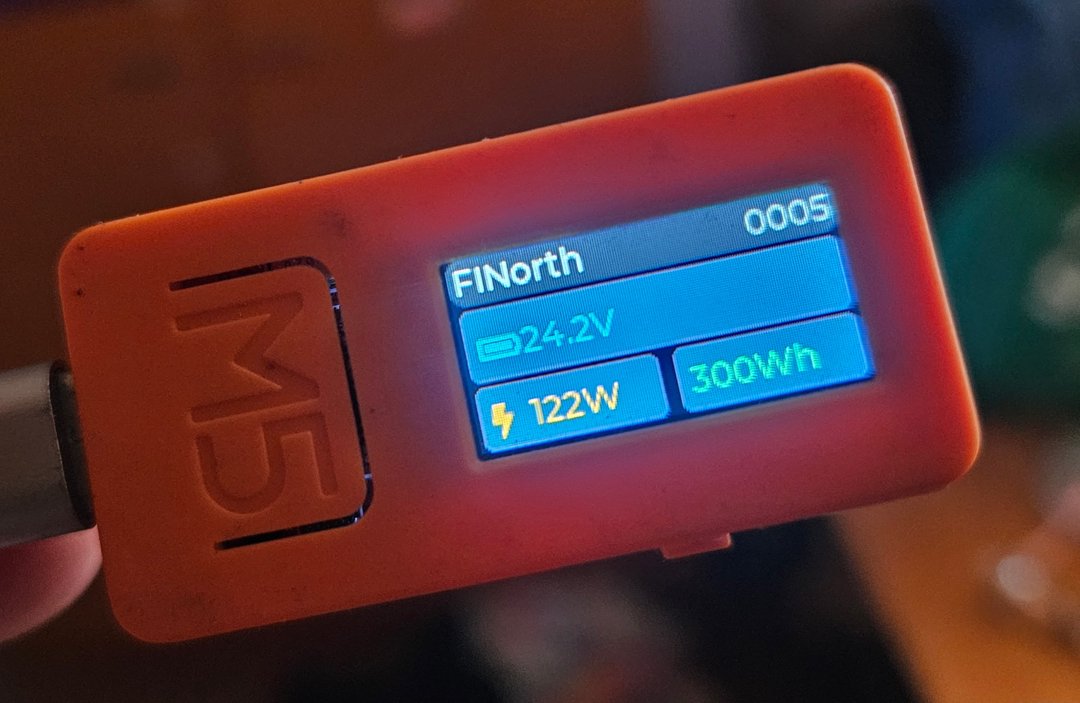
The Tiny is about as small as a useful readout gets: a stick-sized OLED showing three values at a glance. The photo is a power example — battery 24.2 V, 122 W, 300 Wh — but the slots are configurable to whatever you check most:
- Tank level + battery voltage — the classic for off-grid water systems.
- Gate state + last vehicle arrival — who’s coming and going.
- Water trough + electric fence — for a stock property, the two “alert me now” points.
Pocket-sized and USB-powered, happy clipped to a dash, a switchboard, or the edge of a shelf — one critical readout, always visible.
Medium
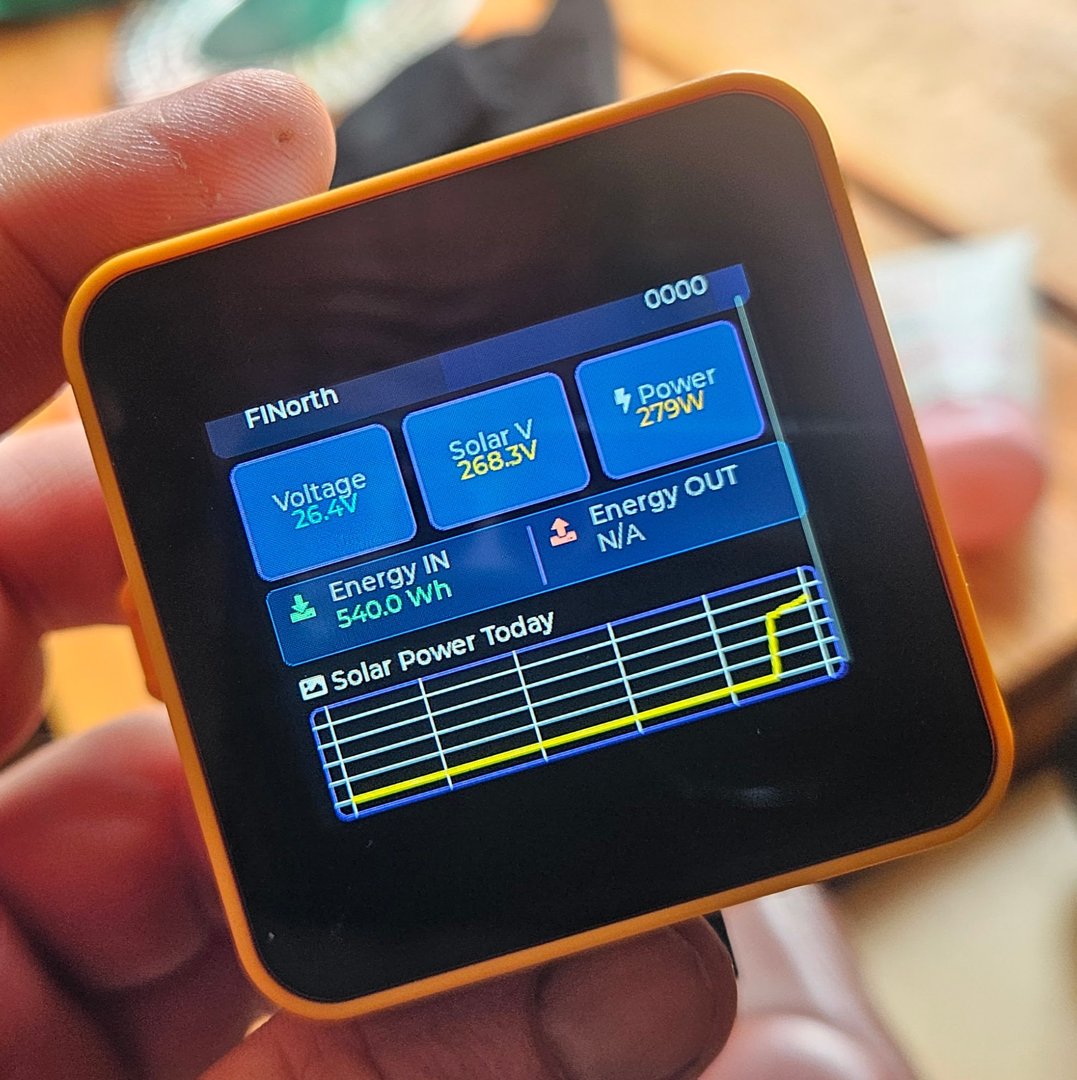
The Medium steps up to a square colour screen: several cards at once, plus a small “today” chart. The photo shows a power example — voltage, solar volts, power, and energy in/out, with a Solar Power Today sparkline along the bottom — but, like the Tiny, the cards and the charted metric are configurable.
It’s the middle ground: more context than the Tiny, without the wall-mount footprint of a large display.
Hardware
Both are USB-C powered and use the same wireless radio as the rest of the hub family — the only difference between them, and from a full hub, is the screen. Configurable in firmware: which sensors, which fields, and what thresholds turn a value red.
Pairs well with
- A large display elsewhere on the site as the canonical “everything” view, with a small display as the “things I check daily” satellite.
- Power management — the solar/battery source shown in both photos.
Building this into a larger site? That’s exactly what we do — start a custom build or email us.